Erpnext Datev
DATEV-Integration for ERPNext
- Author: alyf-de
- Repository: https://github.com/alyf-de/erpnext_datev
- GitHub stars: 51
- Forks: 25
- License: GPL-3.0
- Category: Integrations
- Maintenance: Actively Maintained
- Frappe versions: v13, v14, v15, v16
Install Erpnext Datev
bench get-app https://github.com/alyf-de/erpnext_datevTags
- business
- datev
- erpnext
- frappe-framework
- integration
Add the Frappe Gems badge to your README
Maintain Erpnext Datev? Paste this into your README:
[](https://frappegems.com/gems/apps/alyf-de/erpnext_datev)About Erpnext Datev
ERPNext - DATEV Integration
Integration between ERPNext and DATEV.
-
When a voucher is submitted, it will be sent to DATEV Unternehmen Online by email. Either by converting the document to PDF first (outgoing vouchers) or by sending files attached to the document (incoming vouchers).
DATEV CSV Export
Export raw GL Entries from ERPNext in the DATEV CSV format.
Install on Frappe Cloud
- Go to https://frappecloud.com/dashboard/#/sites and click the "New Site" button.
- In Step 2 ("Select apps to install"), select "ERPNext" and "DATEV Unternehmen Online Integration".
- Complete the new site wizard.
Setup DATEV CSV Export
Datev Settings
Configure you client number, you tax consultant's number and a temporary against account. We recommend keeping the default against account "9090" as described in the DATEV Help Center.
DATEV Report
Now you can use the report "DATEV". This is a preview of the transactions data. It can be exported, along with the master data, as zip file via the report's menu. Your tax xonsultant can then import your GL Entries into his DATEV system.
[!IMPORTANT] ERPNext does not have automatic VAT deduction ("Automatikkonten") on the GL Entry level. By using the default against account "9090", the automation is disabled.
If you use a different against account, please ensure to only book to non-automatic accounts in ERPNext. Otherwise, the VAT deduction will be incorrect.
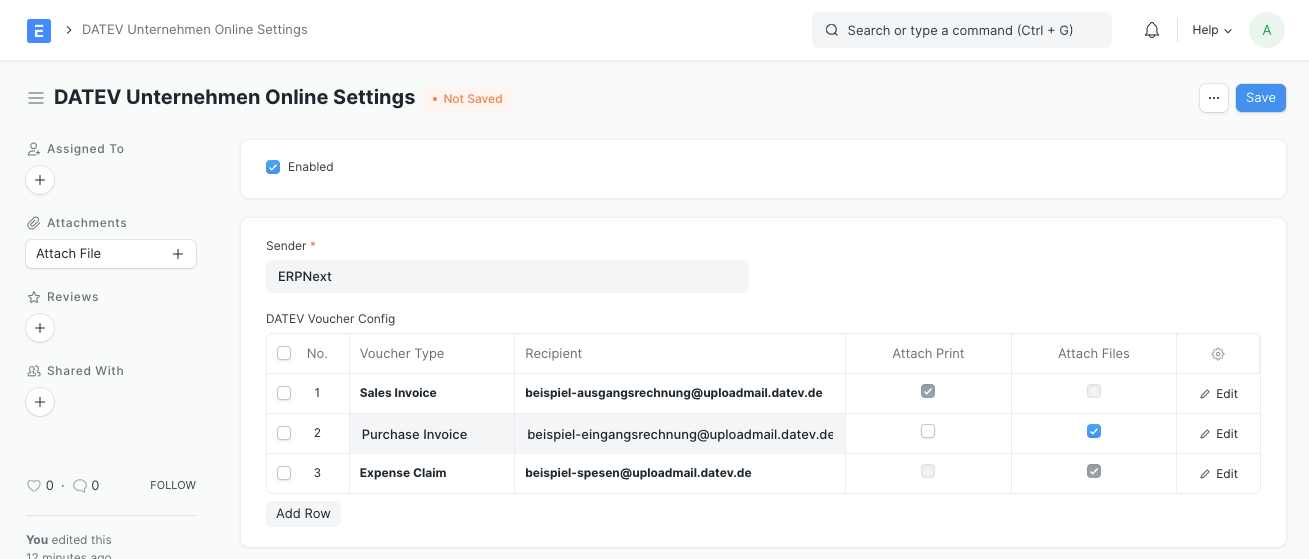
Setup DATEV Unternehmen Online [en]
- Open DATEV Unternehmen Online Settings
- Enable the integration
- Select the Email Account that should be used to send receipts to DATEV Unternehmen Online
- Add a row to the table
- Select the Voucher Type (Sales Invoice, Purchase Invoice or Expense Claim)
- Paste the target email address provided by DATEV Unternehmen Online (DATEV Help Center)
- Enable "Add Attachments" or "Add Print"
- Save
Einrichtung DATEV Unternehmen Online [de]
- Öffnen Sie DATEV Unternehmen Online-Einstellungen (engl. DATEV Unternehmen Online Settings)
- Aktivieren Sie die Integration
- Wählen Sie das E-Mail-Konto (engl. Email Account) aus, das für den Versand von Belegen an DATEV Unternehmen Online verwendet werden soll
- Fügen Sie der Tabelle eine Zeile hinzu
- Wählen Sie die Belegart (engl. Voucher Type)
- Fügen Sie die für diese Belegart von DATEV Unternehmen Online bereitgestellte Ziel-E-Mail-Adresse ein (mehr dazu im DATEV Help Center) > Achtung: Die E-Mail-Adresse des Senders muss mit dem in Schritt 3 ausgewählten E-Mail-Konto übereinstimmen
- Aktivieren Sie "Anhänge hinzufügen" oder "Druck hinzufügen".
- Speichern Sie die DATEV Unternehmen Online-Einstellungen
Kompatibilität mit PDF on Submit
Falls Sie PDF on Submit für dieselbe Belegart verwenden, wählen Sie "Anhänge hinzufügen" statt "Druck hinzufügen". PDF on Submit fügt dann die PDF-Datei als Anhang zum Beleg hinzu und die DATEV-Integration versendet diesen.
Disclaimer
"DATEV" and "DATEV Unternehmen Online" are trademarks of DATEV eG. This integration is not approved or endorsed by DATEV eG.
License
GPLv3
Related Integrations apps for Frappe & ERPNext
- Insights — Open Source Business Intelligence Tool
- Raven — Simple, open source team messaging platform
- Frappe Whatsapp — WhatsApp cloud integration for frappe
- Frappe Assistant Core — Infrastructure that connects LLMs to ERPNext. Frappe Assistant Core works with the Model Context Protocol (MCP) to expose ERPNext functionality to any compatible Language Model
- Biometric Attendance Sync Tool — A simple tool for syncing Biometric Attendance data with your ERPNext server
- Frappe React Sdk — React hooks for Frappe
- Frappe Js Sdk — TypeScript/JavaScript library for Frappe REST API
- Mcp — Frappe MCP allows Frappe apps to function as MCP servers