Maintain Frappe Whatsapp? Paste this into your README:
[](https://frappegems.com/gems/apps/shridarpatil/frappe_whatsapp)
About Frappe Whatsapp
# Frappe WhatsApp
[Documentation](https://shridarpatil.github.io/frappe_whatsapp/)
WhatsApp integration for Frappe/ERPNext. Use Meta's WhatsApp Cloud API directly without any third-party integration.
[](https://www.youtube.com/watch?v=nq5Kcc5e1oc)
[](https://www.youtube.com/watch?v=TncXQ0UW5UM)

> **Note:** If you're not using live credentials, follow [step no 2](https://developers.facebook.com/docs/whatsapp/cloud-api/get-started) to add the number on Meta to which you are sending messages.
## Features
- **Multi-Account Support** - Manage multiple WhatsApp Business accounts
- **Two-way Messaging** - Send and receive messages with full conversation tracking
- **Template Management** - Create and sync WhatsApp templates with Meta
- **WhatsApp Flows** - Build interactive forms using WhatsApp's native Flow Builder
- **Interactive Messages** - Send button and list messages for quick user responses
- **WhatsApp Notifications** - Automated notifications triggered by DocType events
- **Bulk Messaging** - Send campaigns to recipient lists with variable substitution
- **Webhook Support** - Real-time message delivery and status updates
- **Media Support** - Send and receive images, documents, videos, and audio files
- **Sync from Meta** - Import and sync templates and flows from your Meta Business Account
- **ERPNext Integration** - Native integration with Frappe/ERPNext DocTypes
## Installation
### Step 1: Get the app
```bash
bench get-app https://github.com/shridarpatil/frappe_whatsapp
```
### Step 2: Install on your site
```bash
bench --site [sitename] install-app frappe_whatsapp
```
## Quick Setup
### 1. Get WhatsApp Credentials
Visit [Meta Developer Portal](https://developers.facebook.com/docs/whatsapp/cloud-api/get-started) to set up your WhatsApp Business API.
### 2. Configure WhatsApp Account
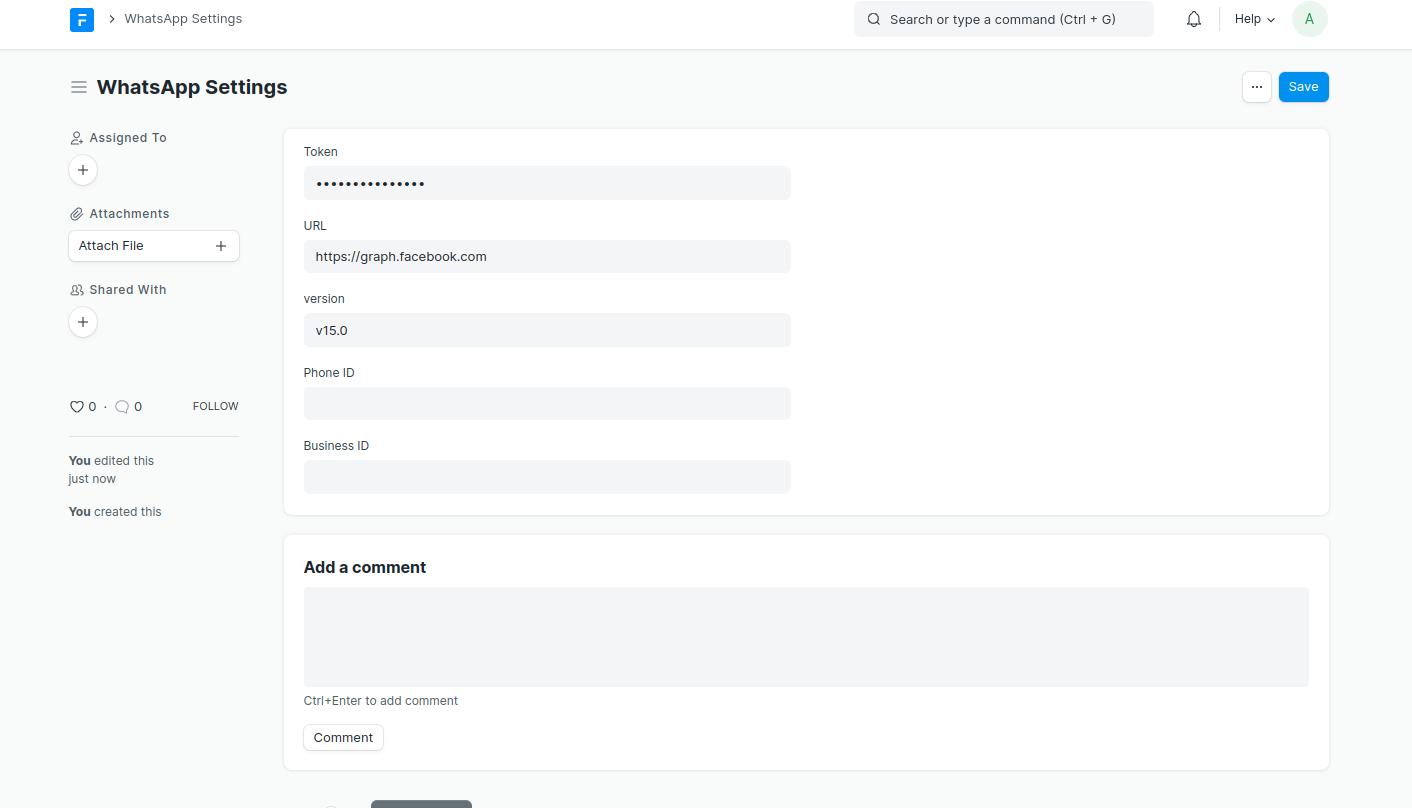
Go to **WhatsApp Account** in Frappe and enter your credentials:
- Account Name
- Access Token
- Phone Number ID
- Business Account ID
- App ID
- Webhook Verify Token
### 3. Create Templates
Create WhatsApp templates that are approved by Meta:

## Core Features
### WhatsApp Notifications
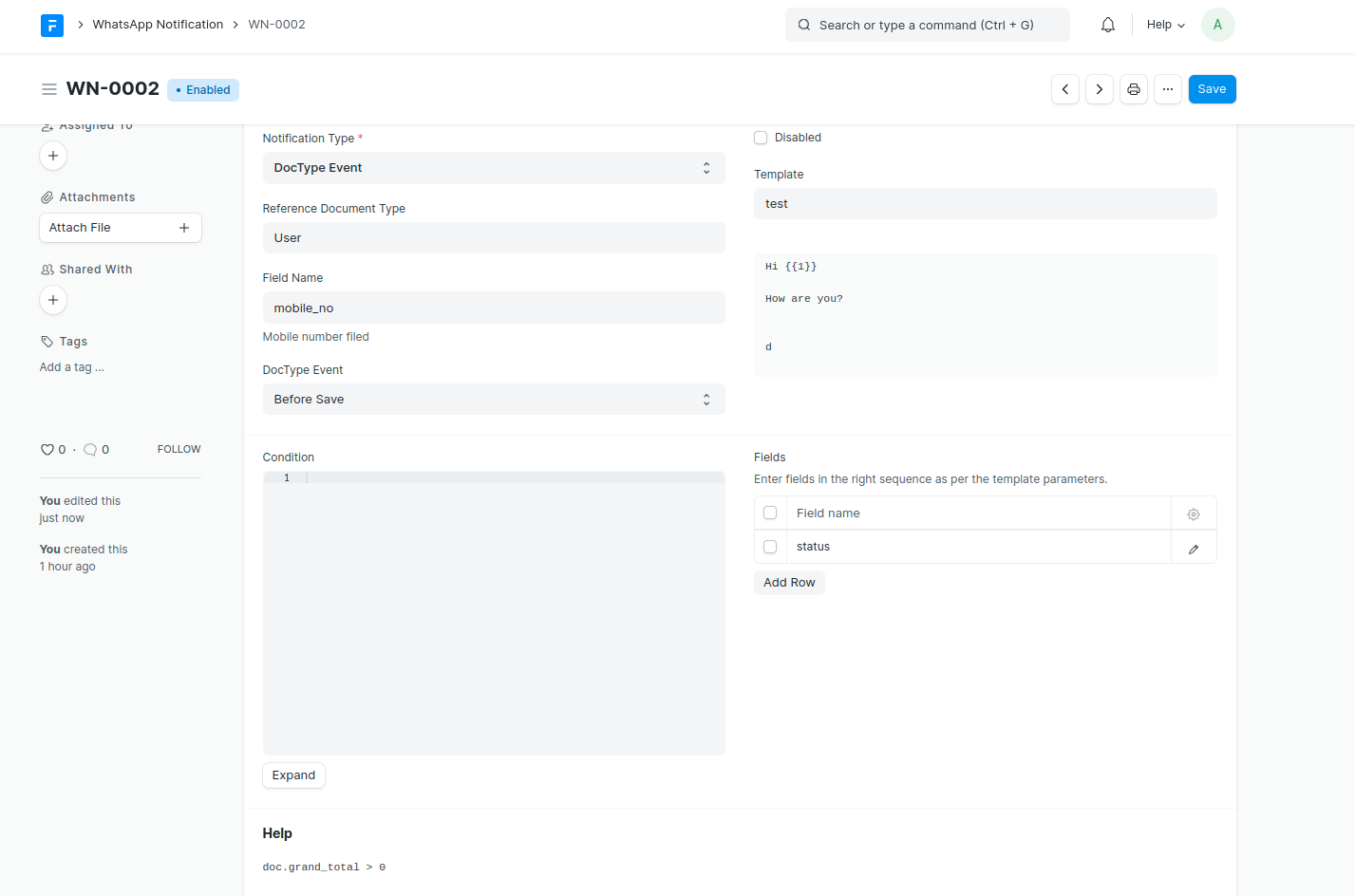
Automatically send WhatsApp messages based on DocType events.
**Supported Triggers:**
- DocType Events: Before/After Insert, Validate, Save, Submit, Cancel, Delete
- Scheduler Events: Hourly, Daily, Weekly, Monthly
- Date-based: Days Before/After a specified date field
**Features:**
- Map template parameters to DocType fields
- Add conditions using Python expressions
- Attach document print PDFs or custom files
- Set DocType field values after sending (e.g., mark as notified)
- Support for interactive buttons with dynamic URLs
### Bulk WhatsApp Messages
Send WhatsApp messages to multiple recipients at once.
**Features:**
- Import recipients from any DocType (Customer, Contact, etc.)
- Create recipient lists for reuse
- Variable substitution from recipient data
- Background processing with progress tracking
- Retry failed messages
- Select specific WhatsApp account for sending
**Recipient Types:**
1. **Individual Recipients** - Add recipients directly with their phone numbers
2. **Recipient List** - Use a pre-configured WhatsApp Recipient List
**Variable Types:**
1. **Common** - Same values for all recipients
2. **Unique** - Different values per recipient (from recipient data)
### Direct Messaging
Send messages without templates (within 24-hour window):

### Interactive Messages
Send interactive button and list messages for quick user responses.
**Button Messages:**
- Up to 3 quick reply buttons
- Users tap to respond instantly
- Great for confirmations, options, and CTAs
**List Messages:**
- Up to 10 items organized in sections
- Users select from a menu
- Ideal for product catalogs, service menus, FAQs
### WhatsApp Flows
Build interactive forms using WhatsApp's native Flow Builder. Flows provide a rich UI experience for collecting structured data from users.
**Features:**
- Visual form builder with multiple screens
- Support for text inputs, dropdowns, date pickers, and more
- Client-only flows (no endpoint required)
- Publish and manage flows directly from Frappe
- Send flow messages and receive responses via webhook
**Supported Field Types:**
- TextInput, TextArea
- Dropdown (with static options)
- DatePicker
- RadioButtonsGroup, CheckboxGroup
- OptIn
- Text display components (TextHeading, TextBody, TextSubheading, TextCaption)
**Flow Actions:**
- Create on WhatsApp - Push new flows to Meta
- Upload Flow JSON - Update flow definition
- Publish - Make flow available to all users
- Deprecate - Mark flow as deprecated
- Send Test - Test draft flows with registered test numbers
- Sync from Meta - Import existing flows back to Frappe
### Sync from Meta
Keep your Frappe data synchronized with your Meta Business Account.
**Templates:**
- Go to **WhatsApp Templates** list view
- Click **Sync from Meta** button
- All templates from active WhatsApp accounts are imported/updated
**Flows:**
- Go to **WhatsApp Flow** list view
- Click **Sync from Meta** button
- Select the WhatsApp Account to sync from
- New flows are imported, existing flows are updated with latest status and JSON
### Custom Data Templates
Send templates using custom data instead of DocType fields:
```python
doc.set("_data_list", [
{"phone": "+1234567890", "name": "John", "order_id": "ORD-001"},
{"phone": "+0987654321", "name": "Jane", "order_id": "ORD-002"}
])
```

## Webhook Setup
### Configure Webhook on Meta
1. Go to your Meta Developer App
2. Set Webhook URL: `/api/method/frappe_whatsapp.utils.webhook.webhook`
3. Add Verify Token (same as in WhatsApp Account settings)
4. Subscribe to webhook fields:
- `messages` - to receive incoming messages
- `message_template_status_update` - for template status updates
### Incoming Messages
Messages received via webhook are automatically created as WhatsApp Message documents:

## Multi-Account Support
Manage multiple WhatsApp Business accounts for different use cases:
- Set default accounts for incoming and outgoing messages
- Select specific accounts when sending bulk messages
- Route notifications through designated accounts
- Auto-read receipts per account
## Recommended Apps
Enhance your WhatsApp experience with these companion apps:
### WhatsApp Chat
A chat app for Frappe Desk to manage WhatsApp conversations.
| | |
|---|---|
| **Features** | Real-time messaging, media support, contact management, read receipts |
| **Install** | `bench get-app https://github.com/shridarpatil/whatsapp_chat` |
| **Marketplace** | |
| **Use Cases** | Customer conversations, sales follow-ups, support tickets |
### WhatsApp Chatbot
Build automated chatbots with flows, keyword replies, and AI-powered responses.
| | |
|---|---|
| **Features** | Multi-step flows, keyword matching, AI fallback (OpenAI/Anthropic/Google), session management |
| **Install** | `bench get-app https://github.com/shridarpatil/frappe_whatsapp_chatbot` |
| **Marketplace** | |
| **Use Cases** | Customer support, order status, appointment booking, lead capture |
## Documentation
For detailed documentation, visit [https://shridarpatil.github.io/frappe_whatsapp/](https://shridarpatil.github.io/frappe_whatsapp/)
## Contributing
Contributions are welcome! Please feel free to submit a Pull Request.
## License
MIT
Raven — Simple, open source team messaging platform
Frappe Assistant Core — Infrastructure that connects LLMs to ERPNext. Frappe Assistant Core works with the Model Context Protocol (MCP) to expose ERPNext functionality to any compatible Language Model
