Erpnext Petcare
Custom Frappe/ERPNext app for managing pet care services, CRM, and automation.
- Author: tyrovirtuosso
- Repository: https://github.com/tyrovirtuosso/erpnext-petcare
- GitHub stars: 5
- Forks: 6
- License: MIT
- Category: Other
- Maintenance: Actively Maintained
Install Erpnext Petcare
bench get-app https://github.com/tyrovirtuosso/erpnext-petcareTags
- erpnext
- frappe
- frappe-framework
Add the Frappe Gems badge to your README
Maintain Erpnext Petcare? Paste this into your README:
[](https://frappegems.com/gems/apps/tyrovirtuosso/erpnext-petcare)About Erpnext Petcare
ERPNext Petcare
A custom Frappe/ERPNext app for managing pet care services, grooming, customer engagement, and business automation.
Live Sites
- Production: erp.masterpet.co.in
- Development: dev.masterpet.co.in
Features
- Pet Grooming Management: Track grooming reports, checklists, and photos.
- Customer Engagement: Tagging, loyalty programs, and automated service reminders.
- Call Management: Campaigns, call tasks, outcomes, and metrics for CRM-like workflows.
- AI Accountant: Automated journal entry creation using AI and Google Sheets/Drive integration:
- Fetches transactions from Google Sheets
- Processes invoices and documents from Google Drive
- Uses AI to generate accurate journal entries
- Automatically creates entries in ERPNext
- Handles GST compliance and company-specific configurations
- Includes OCR capabilities for invoice processing
- Integrations: Google Calendar, Google Sheets, Voxbay telephony, and more.
- Automation: Scheduled jobs for recurring service requests, customer updates, and loyalty calculations.
- API Endpoints: For service requests, messaging, and external integrations.
Demo
AI Accountant in Action
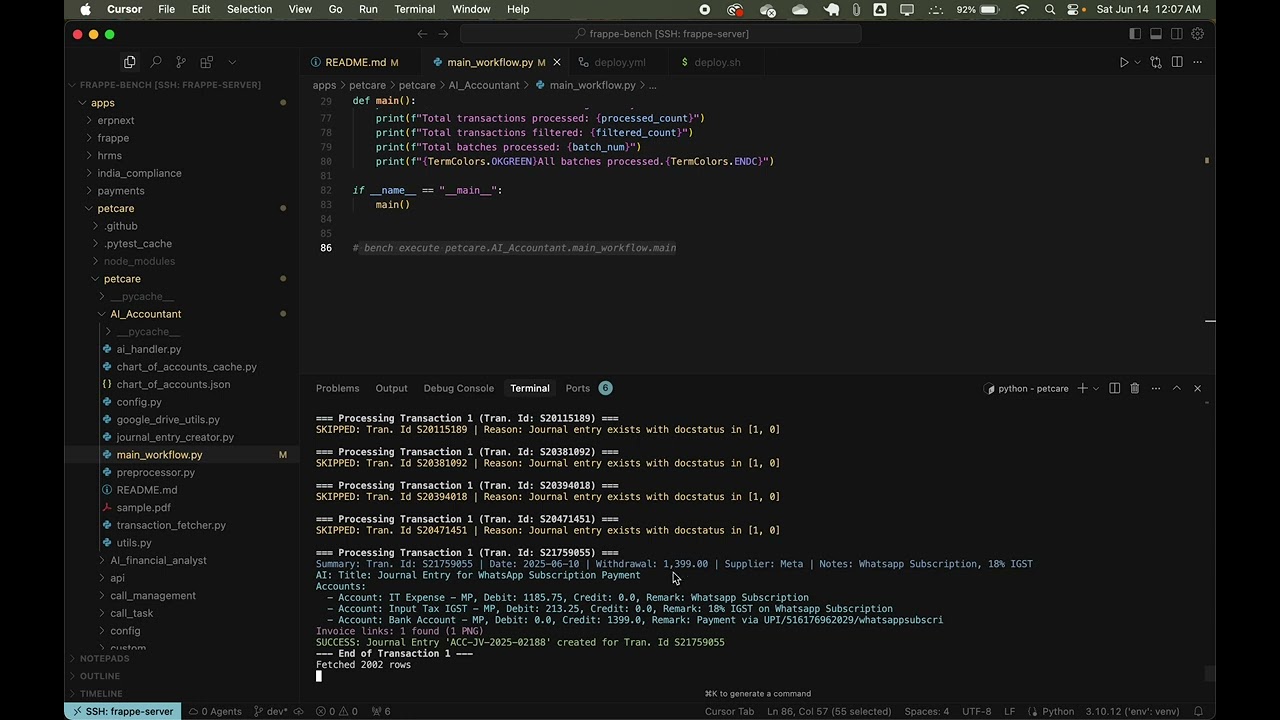
Watch how the AI Accountant automates the entire accounting workflow: - Automated transaction fetching from Google Sheets - Intelligent invoice processing with OCR - AI-powered journal entry generation - Seamless ERPNext integration - GST-compliant accounting entries
CI/CD Pipeline in Action
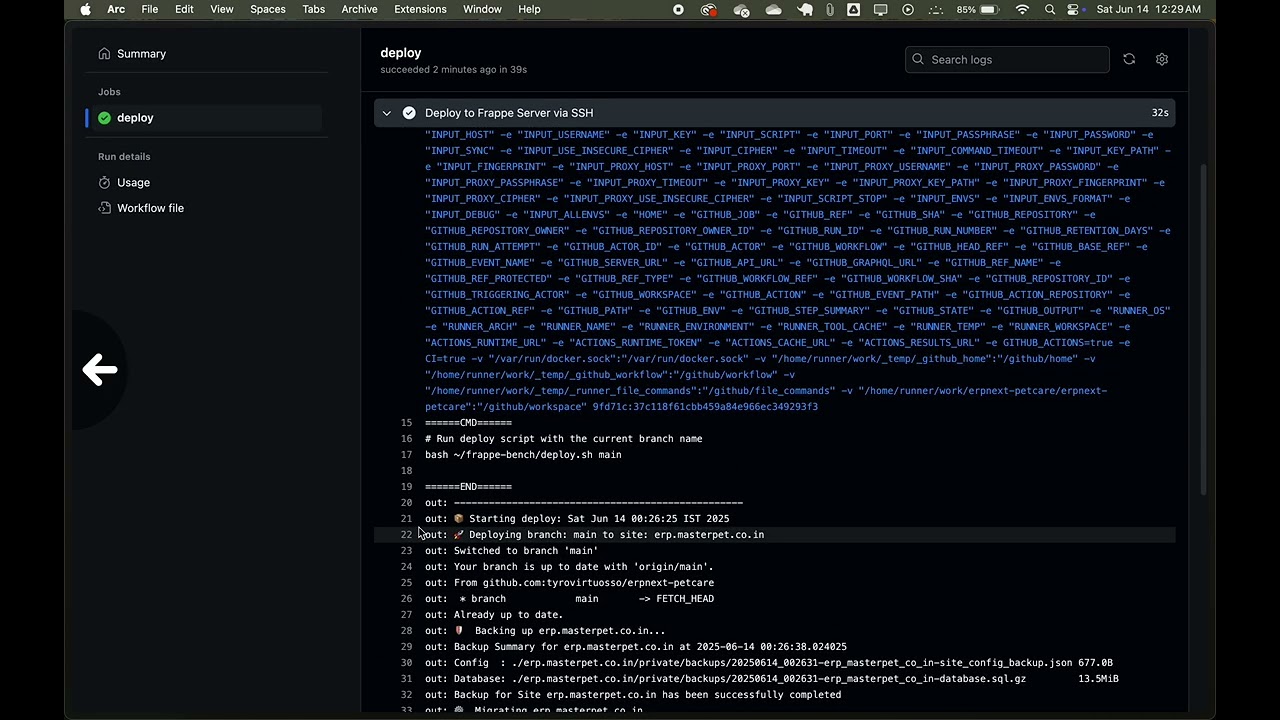
See our automated deployment pipeline in action: - GitHub Actions workflow execution - Automated deployment to development and production - Zero-downtime updates - Automatic backup creation - Health checks and monitoring
Voxbay Telephony Integration
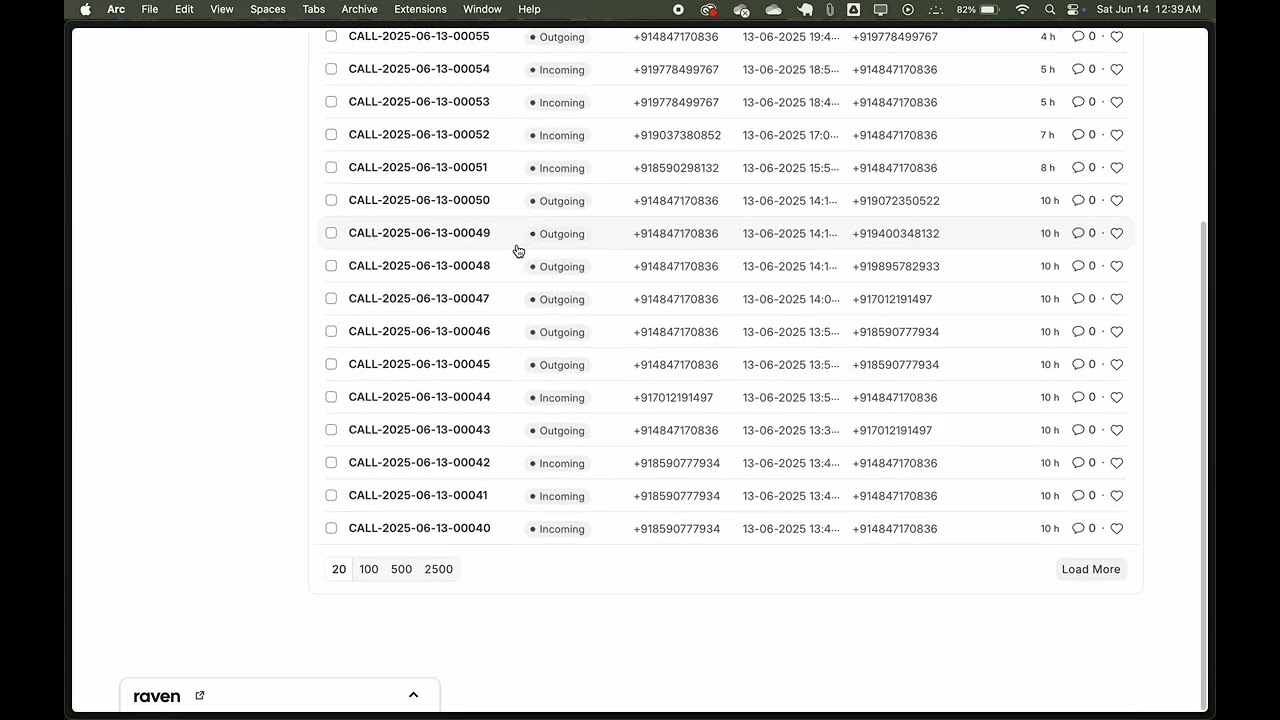
Experience seamless telephony integration with ERPNext: - Automatic call logging and tracking - Real-time customer identification - Call recording management - Automated customer creation - Detailed call analytics and reporting
API Integration
Our Voxbay integration uses a robust API system: - Secure API key authentication - Real-time webhook processing - Automatic customer data synchronization - Intelligent call status tracking - Comprehensive error handling and logging
Customer Location Map
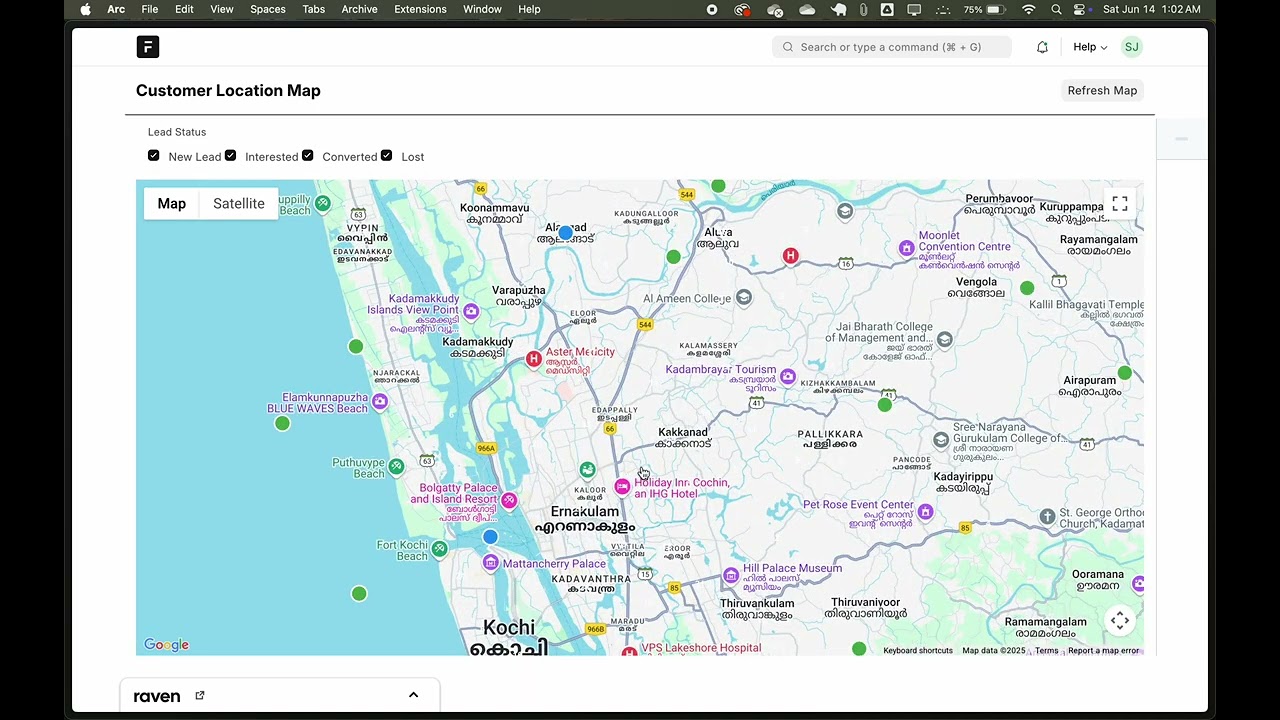
Interactive map visualization of customer locations with advanced features: - Real-time customer location tracking - Lead status-based filtering - Cluster-based visualization - Interactive customer information cards - Territory-based grouping - Service history integration
Key Features
- Smart Clustering: Automatically groups nearby customers for better visualization
- Status-based Filtering: Filter customers by lead status (New Lead, Interested, Converted, Lost)
- Interactive Info Cards: Quick access to customer details, service history, and contact information
- Territory Management: Visualize customer distribution across different territories
- Service Tracking: View days since last service and total pets for each customer
- Facility Indicators: Quick view of parking, electricity, and water availability
Installation
Get the app:
cd ~/frappe-bench/apps
git clone https://github.com/yourusername/erpnext-petcare.git
Install the app on your site:
bench --site yoursite install-app erpnext_petcareRun migrations:
bench --site yoursite migrate
Development Workflow
We follow a dev → main → production workflow:
- Development happens on the
devbranch, deployed to: dev.masterpet.co.in - Once changes are tested and stable, they are merged into
main - Production pulls only from the
mainbranch and is deployed to: erp.masterpet.co.in
Steps:
On dev server:
git checkout dev
# Make changes
bench --site dev.masterpet.co.in migrate
bench restart
git add .
git commit -m "Your changes"
git push origin dev
To push to production:
git checkout main
git merge dev
git push origin main
On prod server:
git pull origin main
bench --site erp.masterpet.co.in migrate
bench restart
Updating Fields or Doctypes?
If you create or modify custom fields, Property Setters, or Doctypes in the dev site (dev.masterpet.co.in), you should export them so they can be version-controlled and applied on production.
Export the changes as fixtures (on dev):
bench --site dev.masterpet.co.in export-fixtures --app erpnext_petcareCommit and push to the
devbranch:git add . git commit -m "Exported updated fixtures" git push origin devMerge to
mainwhen tested:git checkout main git merge dev git push origin mainOn production (
erp.masterpet.co.in), pull and migrate:git pull origin main bench --site erp.masterpet.co.in migrate bench restart
Using bench console (Which Site?)
By default, running:
bench console
will open the console for the site defined in sites/commonsiteconfig.json
To check which site you're in from inside the console:
frappe.local.site
This will return the active site name, like 'erp.masterpet.co.in' or 'dev.masterpet.co.in'.
✅ Best Practice Always specify the site explicitly to avoid mistakes:
bench --site dev.masterpet.co.in console
bench --site erp.masterpet.co.in console
Continuous Integration/Deployment (CI/CD)
Our project uses GitHub Actions for automated deployments to both development and production environments.
🚀 Automated Deployment Flow
Development Branch (
dev):- Automatically deploys to dev.masterpet.co.in
- Triggered on every push to the
devbranch
Production Branch (
main):- Automatically deploys to erp.masterpet.co.in
- Triggered on every push to the
mainbranch
🔧 How It Works
GitHub Actions Workflow
- Located in
.github/workflows/deploy.yml - Uses
appleboy/ssh-actionfor secure SSH deployment - Triggers automatically on code pushes
- Located in
Server-Side Deployment Script
- Located at
~/frappe-bench/deploy.sh - Handles the following tasks:
- Pulls latest code from GitHub
- Runs bench migrate and clears cache
- Restarts necessary ERPNext services
- Performs health checks
- Logs all actions to deploy.log
- Creates automatic backups before changes
- Located at
Security
- Passwordless automation using SSH keys
- Configured sudoers for necessary commands
- Secure handling of sensitive operations
📝 Deployment Logs
All deployment activities are logged to ~/frappe-bench/deploy.log for monitoring and debugging purposes.
Usage
- Access pet care features from the ERPNext desk after installation.
- Configure scheduled jobs and integrations as needed.
Development
- This app is designed for ERPNext v13+ and Frappe v13+.
- Contributions and suggestions are welcome!
License
This project is licensed under the MIT License. See LICENSE for details.
Maintainer: Shane
Related Other apps for Frappe & ERPNext
- Erpnext — Free and Open Source Enterprise Resource Planning (ERP)
- Helpdesk — Modern, Streamlined, Free and Open Source Customer Service Software
- Print Designer — Visual print designer for Frappe / ERPNext
- Ctr — CTR模型代码和学习笔记总结
- Whitelabel — Whitelabel ERPNext
- Fossunited — fossunited.org
- Helm — Helm Chart Repository for Frappe/ERPNext
- Frappe Attachments S3 — A frappe app to upload file attachments in doctypes to s3.