Frappe List Unassign From
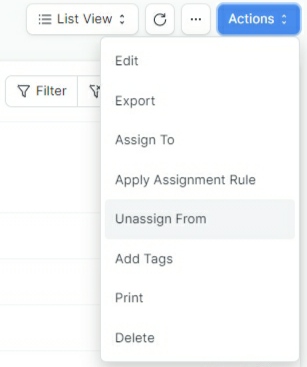
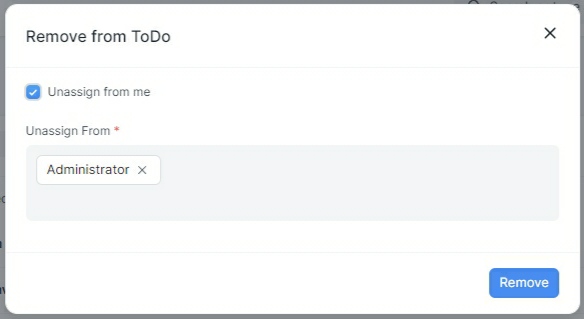
A Frappe plugin that adds the support of unassign from users for single and multiple list selection.
- Author: kid1194
- Repository: https://github.com/kid1194/frappe-list-unassign-from
- GitHub stars: 4
- Forks: 11
- License: MIT
- Category: Developer Tools
- Maintenance: Unmaintained
Install Frappe List Unassign From
bench get-app https://github.com/kid1194/frappe-list-unassign-fromAdd the Frappe Gems badge to your README
Maintain Frappe List Unassign From? Paste this into your README:
[](https://frappegems.com/gems/apps/kid1194/frappe-list-unassign-from)About Frappe List Unassign From
# Frappe List Unassign From
A Frappe plugin that adds the support of unassign from users for single and multiple list selection.
---
### Special Thanks
**A simple display of gratitude and appreciation to those who provided help and kind support.**
- [RJPvT](https://github.com/RJPvT) (Testing)
- [Ragul KM](https://github.com/crazy-explore-r) (Bug Reporting & Screenshots)
---
Related Developer Tools apps for Frappe & ERPNext
- Frappe — Low code web framework for real world applications, in Python and Javascript
- Frappe Docker — Docker environment for developing, deploying, and running Frappe applications (ERPNext and custom apps) in production and development
- Builder — Craft beautiful websites effortlessly with an intuitive visual builder and publish them instantly
- Bench — CLI to manage Multi-tenant deployments for Frappe apps
- Frappe Ui — A set of components and utilities for rapid UI development
- Press — Full service cloud hosting for the Frappe stack - powers Frappe Cloud
- Gameplan — Open Source Discussions Platform for Remote Teams
- Doppio — A Frappe app (CLI) to magically setup single page applications and Vue/React powered desk pages on your custom Frappe apps.