Frappe Better Attach Control
A small plugin for Frappe that adds the support of customizations to the attach control.
- Author: kid1194
- Repository: https://github.com/kid1194/frappe-better-attach-control
- GitHub stars: 55
- Forks: 46
- License: MIT
- Category: Developer Tools
- Maintenance: Unmaintained
Install Frappe Better Attach Control
bench get-app https://github.com/kid1194/frappe-better-attach-controlTags
- attachment
- erpnext
- erpnext-customization
- file-upload
- frappe
- frappe-attachments
- frappe-framework
- uploads
Add the Frappe Gems badge to your README
Maintain Frappe Better Attach Control? Paste this into your README:
[](https://frappegems.com/gems/apps/kid1194/frappe-better-attach-control)About Frappe Better Attach Control
# Frappe Better Attach Control
A small plugin for Frappe that adds customization to the attach control.
It supports RTL layout and dark mode out of the box.
⚠️ **v2 is still in BETA stage** ⚠️

**Apologies in advance for any problem or bug you face with this module.**
**Please report any problem or bug you face so it can be fixed.**
---
🔹Example: ```"Upload Images"```
🔹Default: ```"Upload"``` | | **upload_notes** | Upload text to be displayed.
🔹Example: ```"Only images and videos, with maximum size of 2MB, are allowed to be uploaded"```
🔹Default: ```""``` | | **disable_auto_save** | Disable form auto save after upload.
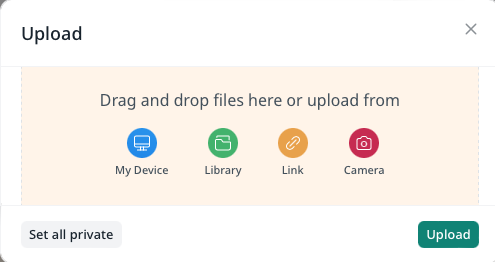
🔹Default: ```false``` | | **disable_file_browser** | Disable file browser uploads.
⚠️ *(File browser is always disabled in Web Form)*
🔹Default: ```false``` | | **allow_multiple** | Allow multiple uploads.
⚠️ *(Field value is a JSON array of files url)*
🔹Default: ```false``` | | **max_file_size** | Maximum file size (in bytes) that is allowed to be uploaded.
🔹Example: ```2048``` for ```2KB```
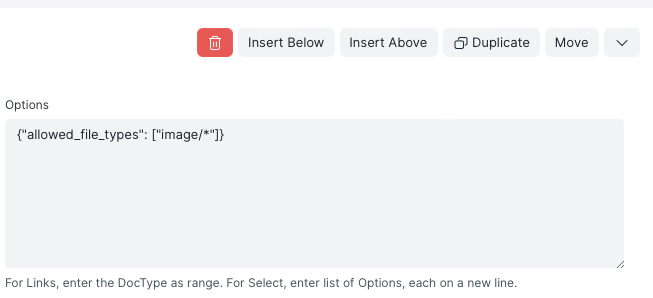
🔹Default: ```Value of maximum file size in Frappe's settings``` | | **allowed_file_types** | Array of allowed file types (mimes) or extensions to upload. Prefix escaped RegExp string types with ```$```.
⚠️ *(File extensions must have a leading dot ".")*
⚠️ *(RegExp string types will not be used to in HTML accept attribute)*
🔹Example: ```["image/*", "video/*", ".pdf", ".doc", "$audio\/([a-z]+)"]```
🔹Default: ```null``` or ```["image/*"]``` | | **max_number_of_files** | Maximum number of files allowed to be uploaded if multiple upload is allowed.
⚠️ *(Bypassing the maximum attachments of doctype might not work)*
🔹Example: ```4```
🔹Default: ```Value of maximum attachments set for the doctype``` | | **crop_image_aspect_ratio** | Crop aspect ratio for images (🔶Frappe >= v14.0.0).
🔹Example: ```1``` or ```16/9``` or ```4/3```
🔹Default: ```null``` | | **as_public** | Force uploads to be saved in public folder by default.
🔹Default: ```false``` | | **allowed_filename** | Only allow files that match a specific file name to be uploaded.
🔹Example: (String)```"picture.png"``` or (RegExp String)```"/picture\-([0-9]+)\.png/"```
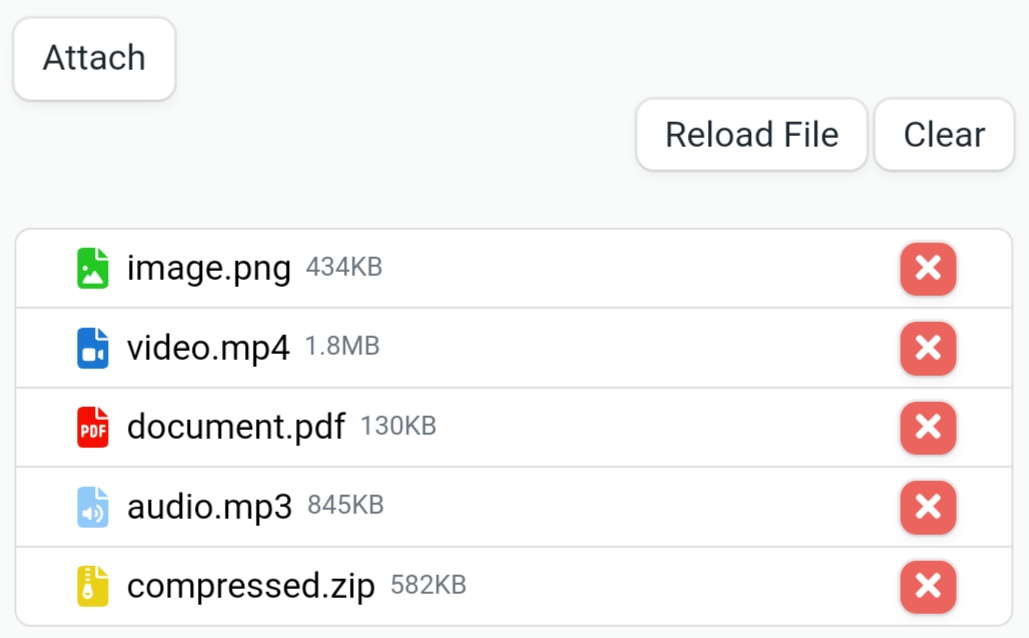
🔹Default: ```null``` | | **allow_reload** | Allow reloading attachments (🔶Frappe >= v13.0.0).
🔶 Affect the visibility of the reload button.🔶
🔹Default: ```true``` | | **allow_remove** | Allow removing and clearing attachments.
🔶 Affect the visibility of the remove and clear buttons.🔶
🔹Default: ```true``` | | **users** 🔴 | Array of custom options for a specific user or group of users.
🔹Example: ```[{"for": "Guest", "disabled": true}, {"for": ["Administrator", "user"], "allow_multiple": true}]```
🔹Default: ```null``` | | **roles** 🔴 | Array of custom options for a specific role or group of roles.
⚠️ *(Custom options for users is prioritized over roles.)*
🔹Example: ```[{"for": ["Administrator", "System"], "allow_multiple": true}]```
🔹Default: ```null``` | 🔴 New - 🔵 Changed --- ### Available JavaScript Methods | Method | Description | | :--- | :--- | | **toggle_auto_save(enable: Boolean !Optional)** 🔵 | Enable/Disable form auto save after upload. | | **toggle_reload(allow: Boolean !Optional)** | Allow/Deny reloading attachments and toggle the reload button (🔶Frappe >= v13.0.0). | | **toggle_remove(allow: Boolean !Optional)** | Allow/Deny removing and clearing attachments and toggle the clear and remove buttons. | | **set_options(options: JSON Object)** | Set or change the plugin options. | 🔴 New - 🔵 Changed --- ### Supported Fields - Attach - Attach Image --- ### Issues If you find bug in the plugin, please create a [bug report](https://github.com/kid1194/frappe-better-attach-control/issues/new?assignees=kid1194&labels=bug&template=bug_report.md&title=%5BBUG%5D) and let us know about it. --- ### License This repository has been released under the [MIT License](https://github.com/kid1194/frappe-better-attach-control/blob/main/LICENSE).
🔹Example: ```"Upload Images"```
🔹Default: ```"Upload"``` | | **upload_notes** | Upload text to be displayed.
🔹Example: ```"Only images and videos, with maximum size of 2MB, are allowed to be uploaded"```
🔹Default: ```""``` | | **disable_auto_save** | Disable form auto save after upload.
🔹Default: ```false``` | | **disable_file_browser** | Disable file browser uploads.
⚠️ *(File browser is always disabled in Web Form)*
🔹Default: ```false``` | | **allow_multiple** | Allow multiple uploads.
⚠️ *(Field value is a JSON array of files url)*
🔹Default: ```false``` | | **max_file_size** | Maximum file size (in bytes) that is allowed to be uploaded.
🔹Example: ```2048``` for ```2KB```
🔹Default: ```Value of maximum file size in Frappe's settings``` | | **allowed_file_types** | Array of allowed file types (mimes) or extensions to upload. Prefix escaped RegExp string types with ```$```.
⚠️ *(File extensions must have a leading dot ".")*
⚠️ *(RegExp string types will not be used to in HTML accept attribute)*
🔹Example: ```["image/*", "video/*", ".pdf", ".doc", "$audio\/([a-z]+)"]```
🔹Default: ```null``` or ```["image/*"]``` | | **max_number_of_files** | Maximum number of files allowed to be uploaded if multiple upload is allowed.
⚠️ *(Bypassing the maximum attachments of doctype might not work)*
🔹Example: ```4```
🔹Default: ```Value of maximum attachments set for the doctype``` | | **crop_image_aspect_ratio** | Crop aspect ratio for images (🔶Frappe >= v14.0.0).
🔹Example: ```1``` or ```16/9``` or ```4/3```
🔹Default: ```null``` | | **as_public** | Force uploads to be saved in public folder by default.
🔹Default: ```false``` | | **allowed_filename** | Only allow files that match a specific file name to be uploaded.
🔹Example: (String)```"picture.png"``` or (RegExp String)```"/picture\-([0-9]+)\.png/"```
🔹Default: ```null``` | | **allow_reload** | Allow reloading attachments (🔶Frappe >= v13.0.0).
🔶 Affect the visibility of the reload button.🔶
🔹Default: ```true``` | | **allow_remove** | Allow removing and clearing attachments.
🔶 Affect the visibility of the remove and clear buttons.🔶
🔹Default: ```true``` | | **users** 🔴 | Array of custom options for a specific user or group of users.
🔹Example: ```[{"for": "Guest", "disabled": true}, {"for": ["Administrator", "user"], "allow_multiple": true}]```
🔹Default: ```null``` | | **roles** 🔴 | Array of custom options for a specific role or group of roles.
⚠️ *(Custom options for users is prioritized over roles.)*
🔹Example: ```[{"for": ["Administrator", "System"], "allow_multiple": true}]```
🔹Default: ```null``` | 🔴 New - 🔵 Changed --- ### Available JavaScript Methods | Method | Description | | :--- | :--- | | **toggle_auto_save(enable: Boolean !Optional)** 🔵 | Enable/Disable form auto save after upload. | | **toggle_reload(allow: Boolean !Optional)** | Allow/Deny reloading attachments and toggle the reload button (🔶Frappe >= v13.0.0). | | **toggle_remove(allow: Boolean !Optional)** | Allow/Deny removing and clearing attachments and toggle the clear and remove buttons. | | **set_options(options: JSON Object)** | Set or change the plugin options. | 🔴 New - 🔵 Changed --- ### Supported Fields - Attach - Attach Image --- ### Issues If you find bug in the plugin, please create a [bug report](https://github.com/kid1194/frappe-better-attach-control/issues/new?assignees=kid1194&labels=bug&template=bug_report.md&title=%5BBUG%5D) and let us know about it. --- ### License This repository has been released under the [MIT License](https://github.com/kid1194/frappe-better-attach-control/blob/main/LICENSE).
Related Developer Tools apps for Frappe & ERPNext
- Frappe — Low code web framework for real world applications, in Python and Javascript
- Frappe Docker — Docker environment for developing, deploying, and running Frappe applications (ERPNext and custom apps) in production and development
- Builder — Craft beautiful websites effortlessly with an intuitive visual builder and publish them instantly
- Bench — CLI to manage Multi-tenant deployments for Frappe apps
- Frappe Ui — A set of components and utilities for rapid UI development
- Press — Full service cloud hosting for the Frappe stack - powers Frappe Cloud
- Gameplan — Open Source Discussions Platform for Remote Teams
- Doppio — A Frappe app (CLI) to magically setup single page applications and Vue/React powered desk pages on your custom Frappe apps.