Frappe Active Users

Frappe plugin that displays a list of current active users.

Install Frappe Active Users

bench get-app https://github.com/kid1194/frappe-active-users

Add the Frappe Gems badge to your README

Maintain Frappe Active Users? Paste this into your README:

[![Listed on Frappe Gems](https://frappegems.com/api/method/frappe_gems.seo.badge?app=kid1194%2Ffrappe-active-users)](https://frappegems.com/gems/apps/kid1194/frappe-active-users)

About Frappe Active Users

# Frappe Active Users A small plugin for Frappe that displays a list of current active users.
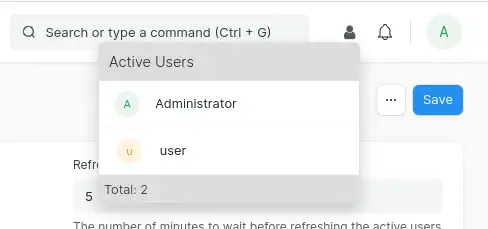
Active Users

--- ### Table of Contents - [Requirements](#requirements) - [Setup](#setup) - [Install](#install) - [Update](#update) - [Uninstall](#uninstall) - [Usage](#usage) - [Contributors](#contributors) - [Issues](#issues) - [License](#license) --- ### Requirements - Frappe >= v13.0.0 --- ### Setup ⚠️ *Important* ⚠️ *Do not forget to replace [sitename] with the name of your site in all commands.* #### Install 1. Go to bench directory ``` cd ~/frappe-bench ``` 2. Get plugin from Github *(Required only once)* ``` bench get-app https://github.com/kid1194/frappe-active-users ``` 3. Build plugin *(Required only once)* ``` bench build --app active_users ``` 4. Install plugin on a specific site ``` bench --site [sitename] install-app active_users ``` 5. Check the usage section below #### Update 1. Go to app directory ``` cd ~/frappe-bench/apps/active_users ``` 2. Get updates from Github ``` git pull ``` 3. Go to bench directory ``` cd ~/frappe-bench ``` 4. Build plugin ``` bench build --app active_users ``` 5. Update a specific site ``` bench --site [sitename] migrate ``` 6. Restart bench ``` bench restart ``` #### Uninstall 1. Go to bench directory ``` cd ~/frappe-bench ``` 2. Uninstall plugin from a specific site ``` bench --site [sitename] uninstall-app active_users ``` 3. Remove plugin from bench ``` bench remove-app active_users ``` 4. Restart bench ``` bench restart ``` --- ### Usage 1. Go to **Active Users Settings** 2. Check the **Is Enabled** box and set the desired **Refresh Interval** 3. Choose the **Roles** and **Users** that you want the plugin to be visible to or hidden from --- ### Contributors - [Monolith Online](https://github.com/monolithon) (Testing & Debugging) --- ### Issues If you find bug in the plugin, please create a [bug report](https://github.com/kid1194/frappe-active-users/issues/new?assignees=kid1194&labels=bug&template=bug_report.md&title=%5BBUG%5D) and let us know about it. --- ### License This repository has been released under the [MIT License](https://github.com/kid1194/frappe-active-users/blob/main/LICENSE).

Related Developer Tools apps for Frappe & ERPNext

  • Frappe — Low code web framework for real world applications, in Python and Javascript
  • Frappe Docker — Docker environment for developing, deploying, and running Frappe applications (ERPNext and custom apps) in production and development
  • Builder — Craft beautiful websites effortlessly with an intuitive visual builder and publish them instantly
  • Bench — CLI to manage Multi-tenant deployments for Frappe apps
  • Frappe Ui — A set of components and utilities for rapid UI development
  • Press — Full service cloud hosting for the Frappe stack - powers Frappe Cloud
  • Gameplan — Open Source Discussions Platform for Remote Teams
  • Doppio — A Frappe app (CLI) to magically setup single page applications and Vue/React powered desk pages on your custom Frappe apps.