Enhanced Kanban View
Frappe Kanban boards with Link field columns, validation dialogs, and automatic synchronization. Inspired by Bitrix24's workflow system.
- Author: ibrahim317
- Repository: https://github.com/ibrahim317/enhanced_kanban_view
- GitHub stars: 19
- Forks: 14
- License: MIT
- Category: Sales & CRM
- Maintenance: Actively Maintained
- Frappe versions: develop
Install Enhanced Kanban View
bench get-app https://github.com/ibrahim317/enhanced_kanban_viewTags
- crm
- erpnext
- frappe
- frappe-app
- kanban-board
Add the Frappe Gems badge to your README
Maintain Enhanced Kanban View? Paste this into your README:
[](https://frappegems.com/gems/apps/ibrahim317/enhanced_kanban_view)About Enhanced Kanban View
🎯 Enhanced Kanban View
A powerful custom Frappe app that extends Kanban view functionality with advanced features for better workflow management and data validation. Inspired by Bitrix24's Kanban board system.
✨ Features
🔗 Link Field-Based Kanban Boards
- Automatically creates columns based on Link fields in your DocTypes
- Auto-syncs columns when linked records are created, renamed, or deleted
📋 Column Rules & Validation
- Define required fields for specific columns
- Show validation dialogs when moving cards between columns
- Auto-revert cards if validation fails
🎨 Enhanced User Experience
- Quick Entry Dialogs with field validation
- Smart field detection for rules
- Seamless Frappe integration
🚀 Installation
bench get-app https://github.com/ibrahim317/enhanced_kanban_view.git
bench --site your-site.com install-app enhanced_kanban_view
bench build
📖 Quick Start
1. Create Link Field-Based Kanban
- Navigate to your DocType's List view
- Click Kanban → "New Kanban Board"
- Select your Link field
- Columns auto-create based on linked records
2. Set Up Column Rules
- Go to Kanban View > Menu > Create Kanban Board Rule
- Choose target column
- Add required fields in the "Required Fields" table
3. Validation Behavior
- Moving cards to columns with rules opens validation dialog
- Fill required fields to proceed
- Failed validation returns card to original position
🎥 Demo & Tutorial
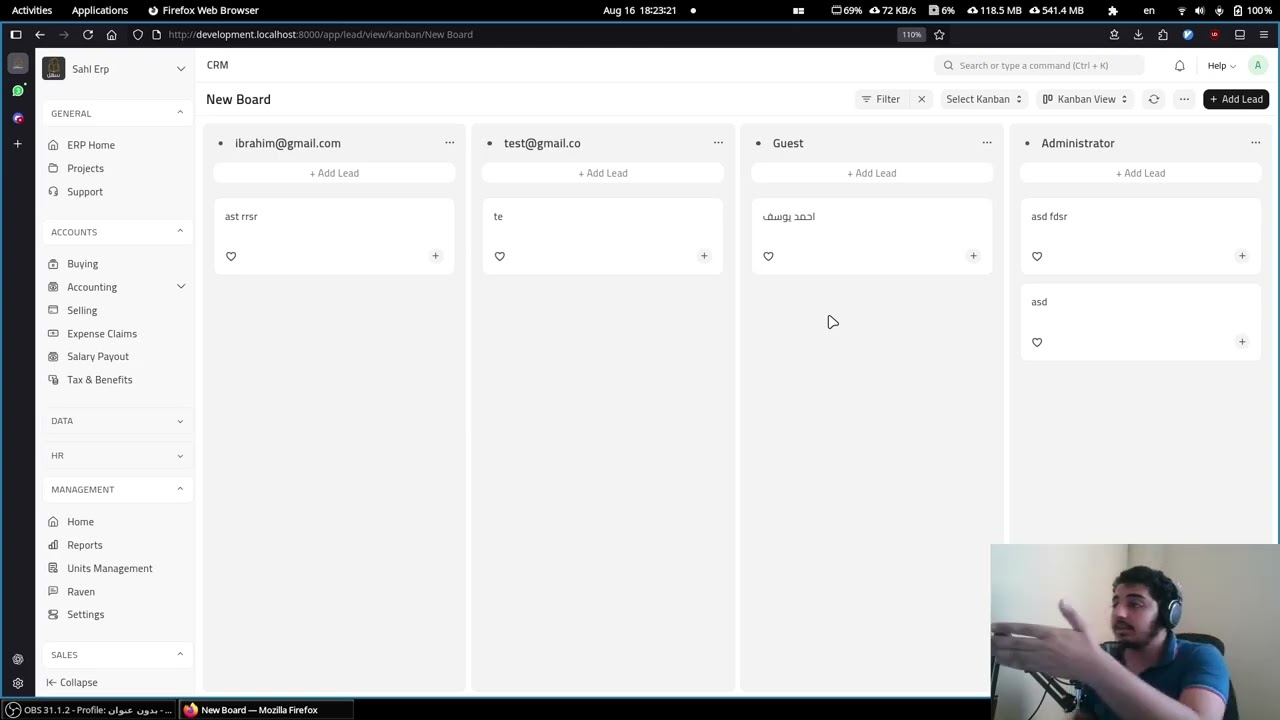
📺 Watch the full demo and tutorial: Enhanced Kanban View Features & Usage
🏗️ Architecture
Core Components
- Kanban Board Rule: Defines validation rules for columns
- Kanban Rule Field: Child table for required fields
- Monkey Patches: Handle automatic column CRUD operations
- API Endpoints: Field validation and board configuration
Database Schema
Kanban Board Rule: {
  "kanban_board": "Link to Kanban Board",
  "kanban_board_column": "Link to Kanban Board Column",
  "required_fields": "Table: Kanban Rule Field"
}

Kanban Rule Field: {
  "field_doctype": "Select: DocField|Custom Field",
  "field_name": "Select: Available Fields"
}
🔧 Configuration
- Hooks: CSS/JS, Monkey Patches, Document Events
- Permissions: System Manager access by default
- Customization: Standard and Custom Field support
🐛 Troubleshooting
Common Issues
- Columns not updating: Check linked DocType permissions and Link field config
- Validation dialogs missing: Verify Kanban Board Rules configuration
- Performance issues: Monitor database queries and consider indexing
🤝 Contributing
- Fork the repository
- Create feature branch
- Make changes and test
- Submit pull request
📄 License
MIT License - see LICENSE
🙏 Acknowledgments
- Bitrix24 - Design inspiration
- Frappe Framework team
- All contributors
📞 Support
- 📧 Email: i.aboelsoud21@gmail.com
- 🐛 Issues: GitHub issues
- 📖 Docs: Code comments and docstrings
Made with ❤️ for the Frappe/ERPNext community
Related Sales & CRM apps for Frappe & ERPNext
- Crm — Fully featured, open source CRM
- Flow — Frappe Flow — native AI agents, tools, and triggers for Frappe
- Sales Kpi — Sales KPI app for ERPNext
- Crm Override — An example Frappe app that demonstrates how to override Frappe UI based apps.
- Eseller Suite — A comprehensive frappe app designed to help selling partners thrive on various online platforms like Amazon and Flipkart. With powerful tools for optimization, analytics, and automation, sellers can boost sales, optimize listings, and stay ahead of the competition effortlessly.
- Meeting Management — Meeting Management app for Frappe and ERPNext with agendas, attendees, minutes of meetings, and action item tracking.
- Sales Prediction — AI-powered sales forecasting in ERPNext(Frappe Application) using Prophet
- Dlitscustom — Erpnext Custom Pricing rule , commission , tools etc..