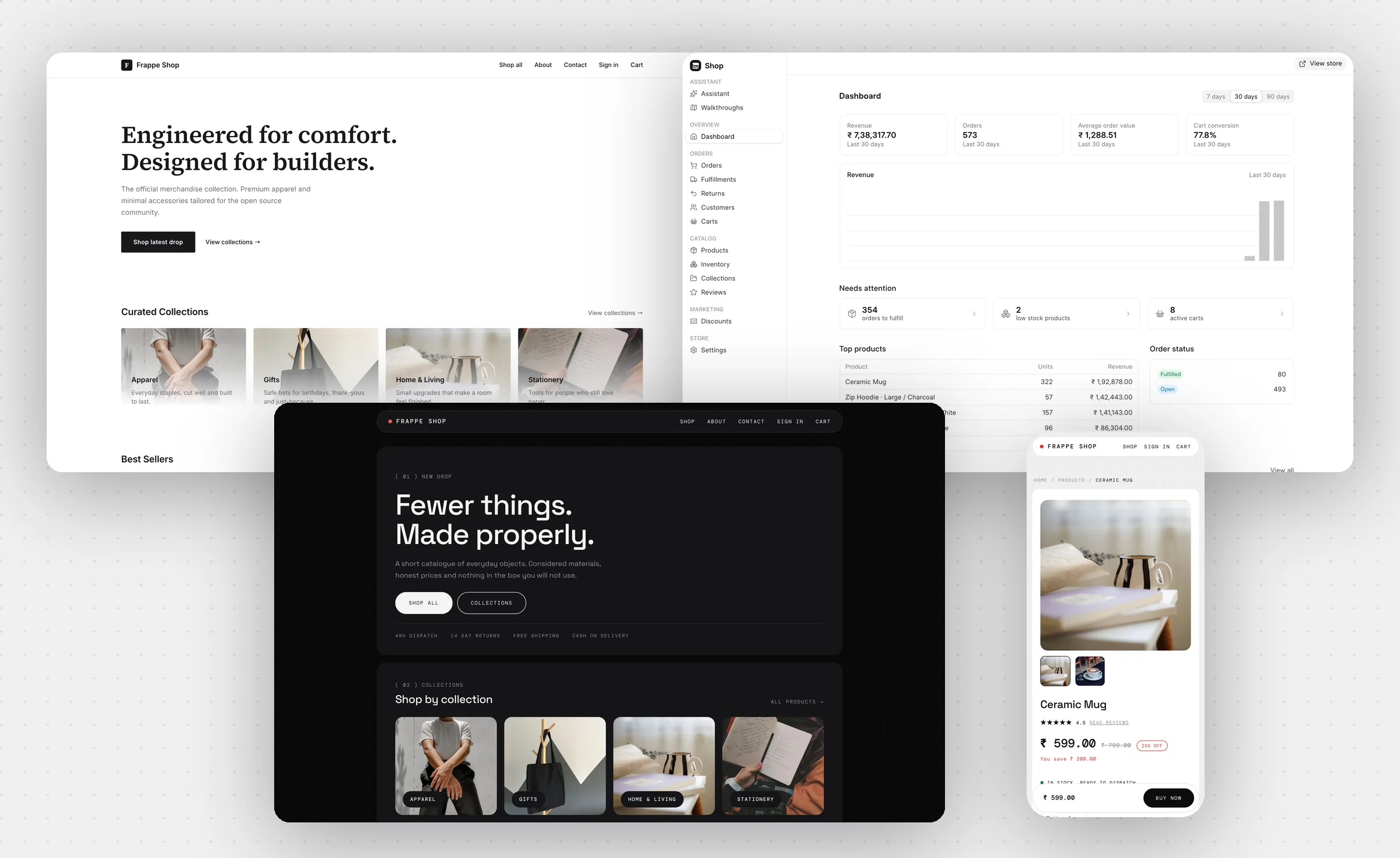
B2C e-commerce storefront powered by ERPNext and Frappe Builder (work in progress, not production ready)

Frappe Shop
**A storefront you can actually redesign**
> [!WARNING]
> Frappe Shop is under active development and is **not production ready**.
> Doctypes, APIs and theme internals are still changing without migrations, so
> treat it as a preview: try it on a fresh site, not on a store you sell from.
## Frappe Shop
Frappe Shop is B2C e-commerce for the Frappe stack. The shopper facing
storefront is rendered entirely by [Frappe Builder](https://github.com/frappe/builder)
pages, so every page is a canvas a merchant can restyle visually rather than a
template only a developer can touch. Orders, items, pricing, stock and customers
are plain ERPNext documents, and a [Frappe UI](https://github.com/frappe/frappe-ui)
admin at `/shop` runs the store day to day.
### Key Features
- **Visual storefront:** Home, listing, product, cart, checkout, order and
account pages are Builder pages. Drag the shipped components onto a canvas to
rebuild any of them, or design new ones.
- **Themes:** Ship as Builder template groups and switch in one click from
Settings. Merchant edits survive a switch, so you can try a theme and go back.
- **Guest checkout:** Carts are keyed by an httponly cookie, so shoppers buy
without an account and can still track the order from a signed link.
- **Payments:** Cash on delivery works with zero configuration. Connect any
gateway supported by the [payments](https://github.com/frappe/payments) app
for online payment.
- **Returns and replacements:** Customers raise a request from their own order
page inside the return window; merchants approve, reject or complete it from a
queue, with a note the customer sees.
- **Fulfillment:** Ship it yourself with a delivery note and tracking, or plug
in a provider through the fulfillment hook.
- **Merchant admin:** Dashboard, orders, fulfillments, returns, products and
variants, inventory, collections, customers, reviews, discounts and carts.
- **ERPNext native:** Products are a publish layer over Item, variants are item
variants, prices are Item Prices and stock is Bin. Nothing is duplicated, so
the rest of ERPNext keeps working.
### Under the Hood
- [Frappe Framework](https://github.com/frappe/frappe): full stack web framework.
- [Frappe Builder](https://github.com/frappe/builder): renders the storefront.
- [ERPNext](https://github.com/frappe/erpnext): orders, stock, pricing, customers.
- [Frappe UI](https://github.com/frappe/frappe-ui): the merchant admin.
## Getting Started
### Local Setup
1. [Set up Bench](https://docs.frappe.io/framework/user/en/installation).
1. In the frappe-bench directory, run `bench start` and keep it running.
1. Open a new terminal, cd into `frappe-bench` and run:
```bash
bench get-app erpnext
bench get-app payments
bench get-app builder
bench get-app shop
bench new-site shop.localhost \
--install-app erpnext --install-app payments --install-app builder --install-app shop
bench --site shop.localhost set-config server_script_enabled 1
bench --site shop.localhost add-to-hosts
bench browse shop.localhost --user Administrator
```
`server_script_enabled` is required: storefront pages read their data through
Frappe's `safe_exec`.
Open `http://shop.localhost:8000/shop` and finish onboarding to set up the
store, sample products and payments. The storefront is then live at
`http://shop.localhost:8000`.
### Development
```bash
bench --site shop.localhost execute shop.demo.setup # sample catalog
bench --site shop.localhost execute shop.demo.teardown # remove it
bench --site shop.localhost run-tests --app shop # server tests
cd apps/shop/e2e && npx playwright test # storefront and admin E2E
cd apps/shop && yarn dev # admin dev server
```
The walkthroughs at `/shop/walkthroughs` seed the exact state for a persona,
guest shopper through to operations manager, and hand you the steps to try that
flow end to end.
### Links
- [Theming guide](docs/theming.md): page data contract, building pages, authoring a theme.
- [Frappe Builder](https://github.com/frappe/builder)
- [Discuss Forum](https://discuss.frappe.io)