Frappe Dynamic Og
Dynamic OG Image Generation in Frappe Sites
- Author: NagariaHussain
- Repository: https://github.com/NagariaHussain/frappe_dynamic_og
- GitHub stars: 15
- Forks: 9
- License: MIT
- Category: Developer Tools
- Maintenance: Unmaintained
- Frappe versions: develop
Install Frappe Dynamic Og
bench get-app https://github.com/NagariaHussain/frappe_dynamic_ogTags
- frappe-app
- frappe-framework
- og-image-generator
Add the Frappe Gems badge to your README
Maintain Frappe Dynamic Og? Paste this into your README:
[](https://frappegems.com/gems/apps/NagariaHussain/frappe_dynamic_og)About Frappe Dynamic Og

Dynamically Generate OG Images in your Frappe sites
 
## 📋 Features - [x] Define DocType-wise templates for generating images - [x] "Live" Preview in OG Image Template - [x] Automatically re-generates images on document changes - [x] Automatically attach the generated image to a particular field in the document - [x] Full Inter Font Family supported in the image HTML template - [x] Automatically delete older image files - [x] Up to 1920x1080 images (for now.) - [x] Tests! (yup, I consider it a pretty good feature 😉) - [x] Update existing OG images on documents in bulk from OG Template form/API ## 📀 Installation Make sure you have Frappe bench installed. You can install this app on your Frappe site by running: ```bash bench get-app https://github.com/NagariaHussain/frappe_dynamic_og bench --site my_site.localhost install-app frappe_dynamic_og ``` This app requires **Node >= 16** and **Frappe Version >= 14**. ## 👩🏼💻 Usage The most important DocType in this app is **OG Image Template**. When you want to generate OG images (well, you can use the generated image for anything you want) for a given DocType, just create a new **OG Image Template** document. For example, if I want to generate an OG image for the `ToDo` DocType, I will set the **For Doctype** field in the form to `ToDo`: 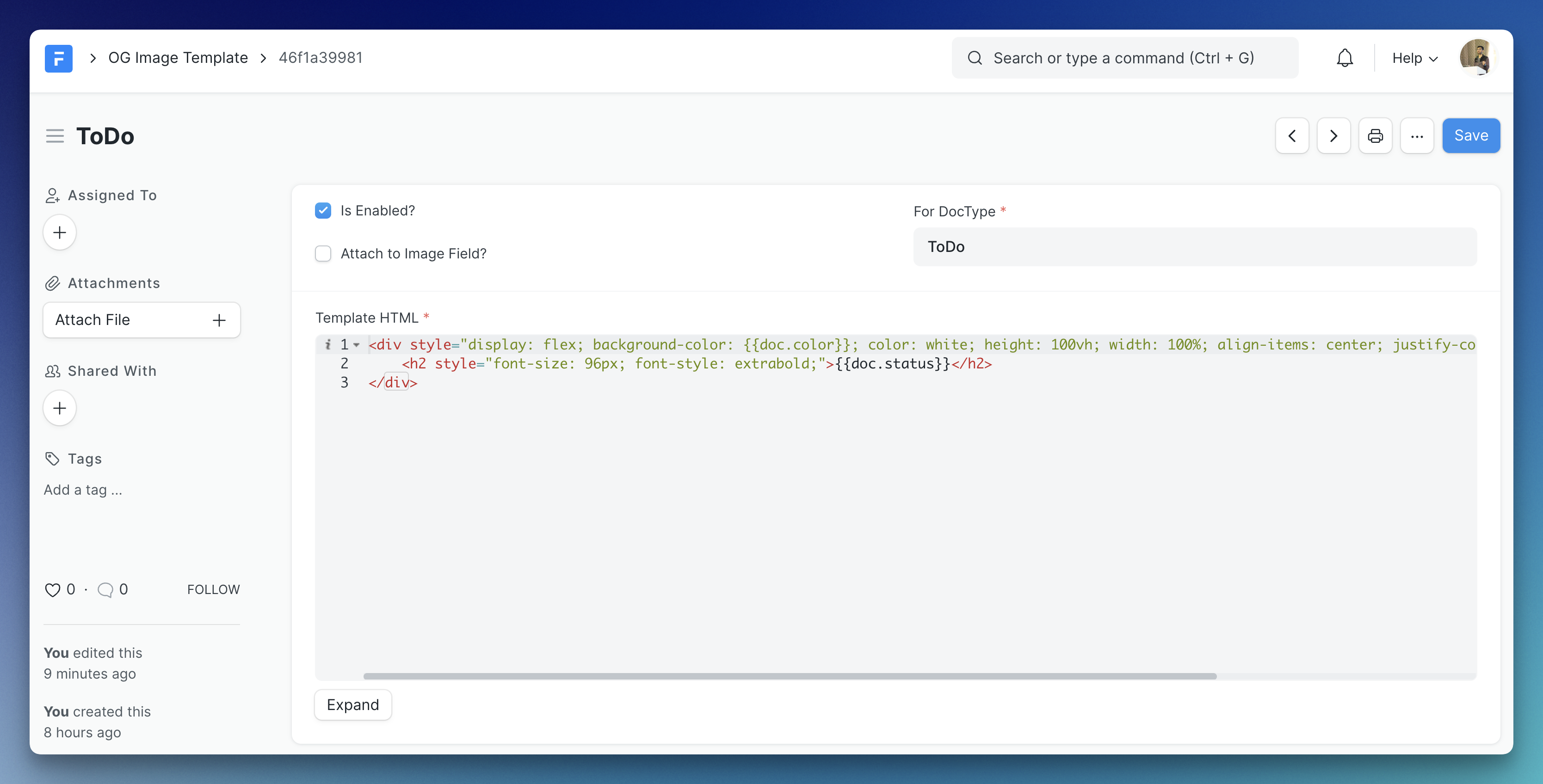 The Template HTML field takes a `jinja` template. The document is available in the content as `doc`, so, in the above template `{{ doc.status }}` will be replaced by the status of the `ToDo` document. We are also using the `color` field of `ToDo` as background color of the generated image. > Please note that when a `div` has more than 1 child, you have to explicitly specify `display:flex;` on it. Please check [satori's documentation](https://github.com/vercel/satori) to learn what HTML element and style properties are supported. **The Result:** https://user-images.githubusercontent.com/34810212/206919225-66016d1a-562c-4fa4-b778-315803ee70ff.mp4 ### Attach To Image Field If you want to attach the generated image to a `Attach Image` type field on the document, you can easily do so by checking the "Attach to Image Field?" checkbox and provide the name for the attach image field in the doctype. For instance, if I want to generate an image for the `User` doctype and attach the image to the **Banner Image** (`banner_image`) field, I only need to do this: 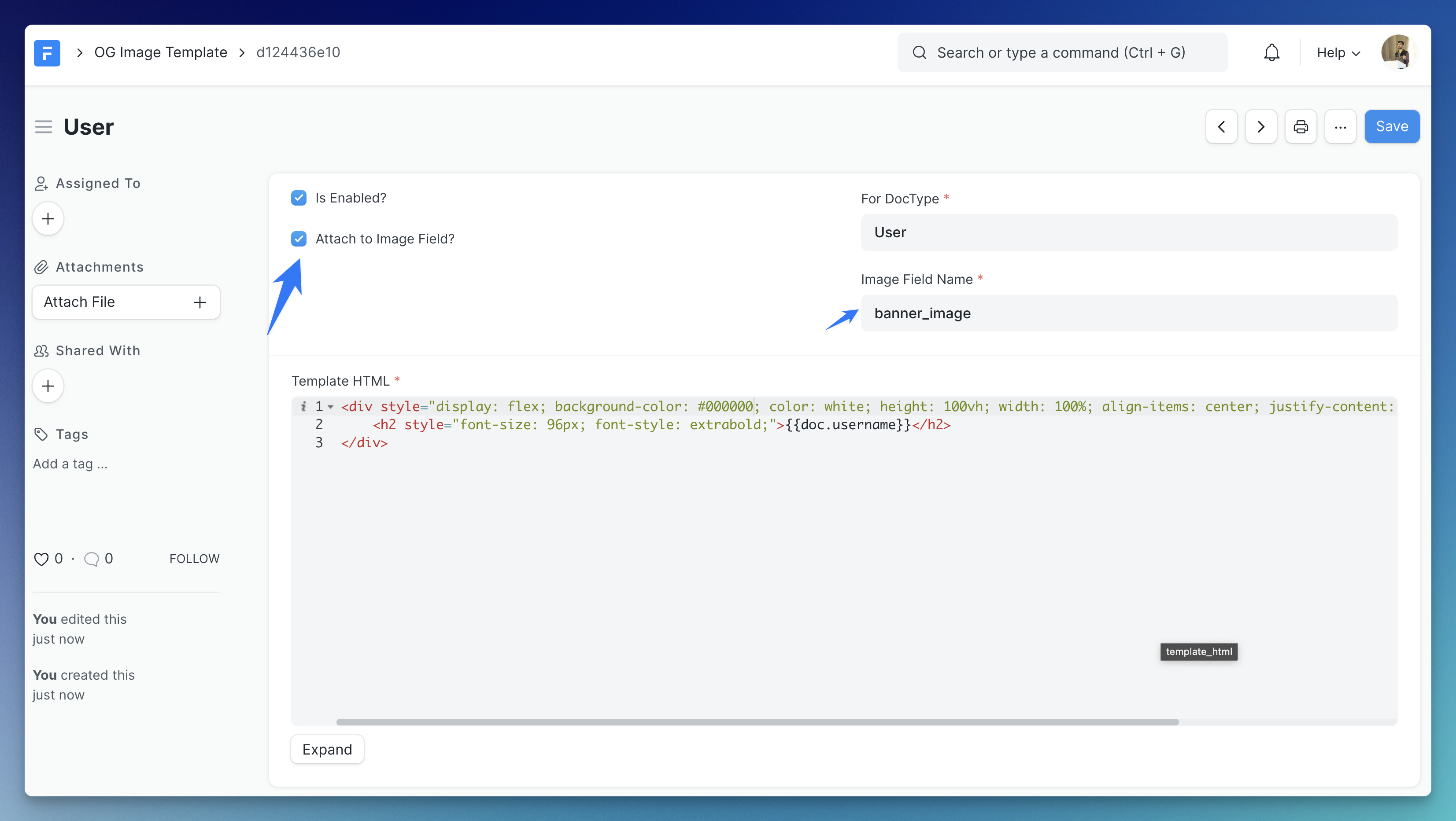 **The Result:** https://user-images.githubusercontent.com/34810212/206919330-63ecd171-e645-4439-aa06-f9d3bf539073.mp4 ### Preview Image You can preview your template using the **Generate Preview** button in the `OG Image Template` doctype:  You can optionally enable **Debug Mode** which shows *bounding boxes* around your elements. ## 🌄 Examples ### Default Template The below is the default template set when you create a new **OG Image Template** document. Template HTML: ```html
{{ doc.doctype }}

```
Output:

If you use the above template for the **Web Form** DocType, you will get the below image generated for a web form with title 'Job Opportunity':

More examples soon.
## 📍 Planned Features
- [ ] Configurable fonts via Google Fonts
- [ ] Use something like [this](https://github.com/jonkemp/inline-css) to support style tags instead of manual inline CSS
- [ ] Only update OG image based on fields used in HTML template
- [ ] API to generate OG images dynamically
- [ ] Queueing of image generation
- [ ] Setting to optimize images
#### License
[MIT](./LICENSE.txt){{ doc.get_title() }}
Related Developer Tools apps for Frappe & ERPNext
- Frappe — Low code web framework for real world applications, in Python and Javascript
- Frappe Docker — Docker environment for developing, deploying, and running Frappe applications (ERPNext and custom apps) in production and development
- Builder — Craft beautiful websites effortlessly with an intuitive visual builder and publish them instantly
- Bench — CLI to manage Multi-tenant deployments for Frappe apps
- Frappe Ui — A set of components and utilities for rapid UI development
- Press — Full service cloud hosting for the Frappe stack - powers Frappe Cloud
- Gameplan — Open Source Discussions Platform for Remote Teams
- Doppio — A Frappe app (CLI) to magically setup single page applications and Vue/React powered desk pages on your custom Frappe apps.